The first time I realized I had Sezzle Spend, it wasn’t because I went looking for it. It was because I got an email that basically said, “Free money inside,” from a company I trust.
So, obviously, I opened it.
It was Sezzle, offering $5 in Sezzle Spend reward money. It obviously wasn’t life-changing—certainly not retire-early money. But it was enough to make me log into the app immediately and ask, “Okay… how do I use this?” Was it automatic? Did I need to activate something? Was it secretly tied to a payment plan I forgot about?
Balances arrive through promotions rather than codes, and current Sezzle Spend offers shows which ones are running.
Turns out, it’s much simpler than it looks.
Sezzle Spend is reward money you earn inside the Sezzle app, and once you know where to click, applying it is straightforward. Let’s walk through it together.
Key Takeaways
- Earn First: Sezzle Spend must be earned through referrals, cashback offers, games, or in-app promotions.
- Apply at Checkout: You can apply Sezzle Spend before confirming a purchase.
- Reduce Existing Plans: It can also be used to lower the remaining balance on active payment plans.
- No New Financing: Using Sezzle Spend does not create a new loan or installment plan.
- Check Expiration Dates: Some rewards expire if not used within the stated timeframe.
Step 1: Earn Sezzle Spend
Before you can use Sezzle Spend, you have to earn it.
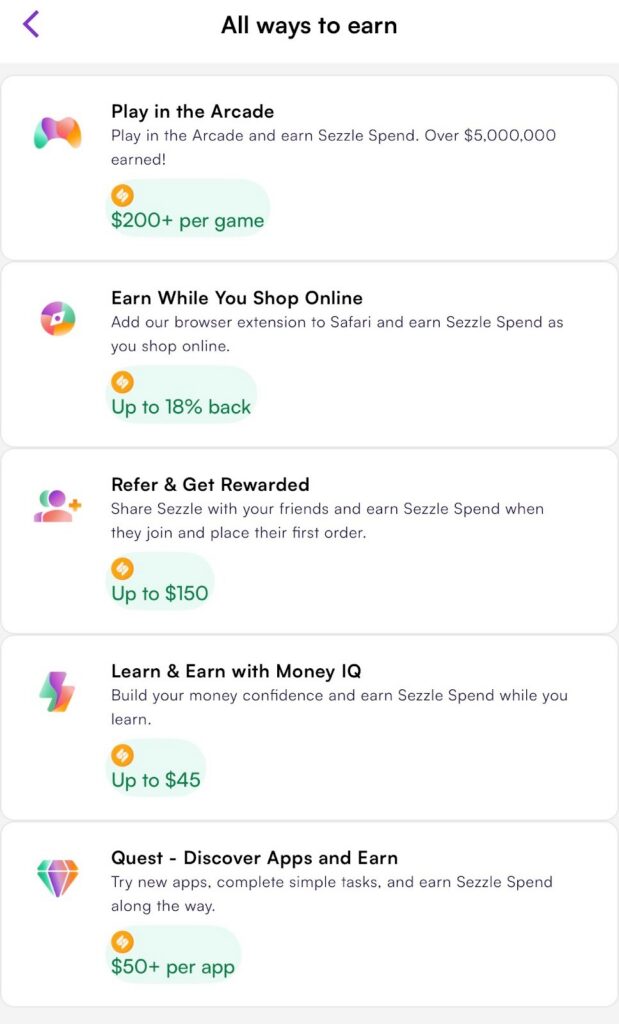
Inside the Earn tab of the Sezzle app, you’ll find several ways to build your reward balance. These rewards aren’t random; they’re part of Sezzle’s loyalty ecosystem, designed to encourage repeat engagement.
And that model makes sense.
According to a Statista survey, 53% of consumers say cashback rewards are their favorite type of loyalty program, ranking higher than coupons or paid membership programs.
That’s exactly the type of structure Sezzle is leaning into with Sezzle Spend.
- Refer friends and earn rewards when they complete a qualifying order
- Shop through cashback offers and receive Spend back
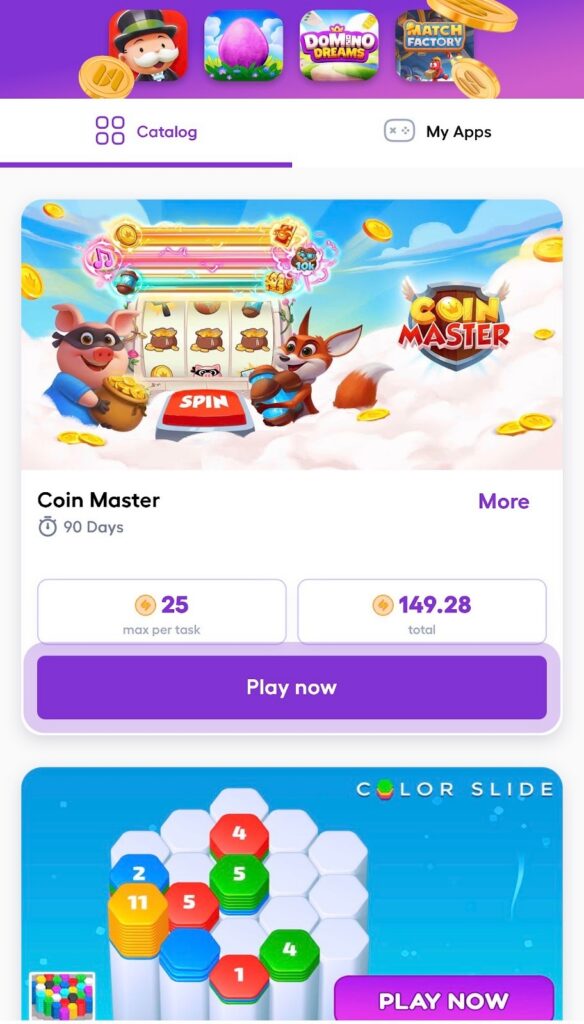
- Play in-app Arcade games
- Complete Money IQ learning modules
- Participate in Quest challenges and app discovery offers
Premium subscribers may earn 1.5–2x rewards on eligible activities. Once earned, the reward balance appears inside your Sezzle account.
You may also get emails or texts that connect you to Sezzle rewards. In this case, you’ll need to sign in or log in and then apply it to a single-use card, one of your Amazon purchases, a Walmart order, or another purchase.
Step 2: Start a Purchase Through Sezzle
Sezzle Spend definitely isn’t a scam (I hear this a lot, and honestly, I can see why—it does feel a little too good to be true!), but to use Sezzle Spend, you do have to run the transaction through Sezzle.
You can:
- Shop inside the Sezzle app
- Use the Sezzle virtual card
- Select Sezzle at checkout with participating retailers
If you bypass Sezzle and pay directly with another method, you won’t be able to apply your reward balance. Use it correctly, though, and “too good to be true” becomes “I just saved $5 on groceries.”
Step 3: Apply Sezzle Money Before Confirming
During checkout, before you confirm the order, you’ll see your available Sezzle Spend balance for free.
Here’s what happens:
- You choose to apply Sezzle Spend
- The reward amount is deducted from your total
- The remaining balance is then split into installments (if using Pay in 4 or Pay in 5)
You’ll see the adjusted total clearly before confirming.
Nothing hidden. No surprise charges.
Step 4: Use It on an Existing Payment Plan (Optional)
One thing I love about my Sezzle subscription is that I can also apply Sezzle Spend to an order I’ve already placed. This process is simple to navigate, even if you’re not planning to buy anything else at the time.
Simply:
- Open the specific payment plan inside the app
- Select the option to apply the available Spend
- Confirm the adjustment
This reduces your remaining balance. It may lower your next scheduled payment or shorten the overall plan. It doesn’t create a new payment schedule, which makes it totally worth it.
What Happens After You Apply It?
Once applied:
- Your updated balance appears immediately
- Your payment schedule adjusts automatically
- Your order details reflect the change
To be clear, Sezzle Spend does not convert to cash, and it cannot be transferred to your bank account. It simply lowers what you owe inside the Sezzle system.
Important Things to Check Before Using It
A few practical notes before you dive in:
One thing that you will discover as you explore Sezzle Spend is that some rewards expire after a certain number of days. If you cancel a purchase, the treatment of the applied reward may vary depending on Sezzle’s terms. Using Sezzle Spend does not eliminate late fees if you miss future payments. It only reduces the current balance, so make sure to review the final total before confirming your purchase.
When Using Sezzle Spend Makes the Most Sense
Sezzle Spend works best when:
- You already use Sezzle regularly
- You’ve accumulated rewards through referrals or cashback
- You want to lower your out-of-pocket cost on a purchase
It’s not a huge windfall. But if you stack referrals, cash back, and promotions over time, Spend can lead to a lower bill (and lower stress as a result).
Final Thoughts
Using Sezzle Spend is simple once you understand it’s a reward balance, not financing, and the steps couldn’t be simpler. All I had to do was earn it inside the app and apply it before checkout. It doesn’t replace your payment method. Instead, Sezzle Spend lets you save on your day-to-day spending, whether you want to cover some household needs or a little “treat yourself” splurge.
FAQs
No, you can’t use Sezzle Spend just anywhere like cash. Sezzle Spend only works on transactions that run through the Sezzle platform.
Yes, Sezzle Spend rewards can expire depending on how they were earned. Promotional bonuses, referral rewards, or cashback offers may have specific expiration timelines, so it’s important to check the details inside the Sezzle app.
No, you cannot withdraw Sezzle Spend to your bank account. The reward balance stays within your Sezzle account and can only be applied toward eligible purchases or existing Sezzle payment plans.
No, using Sezzle Spend does not affect your credit score because it is not a loan or credit product. It’s simply reward money applied to reduce your purchase total inside the Sezzle system.
No, you do not need a Premium subscription to use Sezzle Spend. However, Premium subscribers may earn rewards at a higher rate on certain offers, which can increase how much Sezzle Spend they accumulate over time.